Medical Records
Access Your Own Records on the Patient Portal
You can access all non-sensitive records through the MHS GENESIS Patient Portal.
To learn how to set up your account, view the MHS GENESIS Patient Portal set-up guide.
Naval Health Clinic Lemoore implemented a “Closed Medical Record System” where NHCL maintains positive charge of our beneficiaries’ medical records at all times. This means that your medical records will never leave the custody of the clinic while you are enrolled. This will significantly reduce the possibility of your medical records being lost and ensuring your continuity of care.
Medical records are the property of the U.S. Government and must be maintained at a military treatment facility. It is needed to:
-
Ensure that current information such as laboratory reports, radiology results, medications and treatment plans are recorded in your file.
-
Ensure medical readiness for Active Duty Members.
-
Ensure data in your medical record provides information to healthcare providers/practitioners for quality assurance; for evaluation and improvement of treatment methods; and for development of patient care criteria and enhanced care.
In order to facilitate this, Naval Health Clinic Lemoore established a policy that ensures “no hand-carrying” of medical records by beneficiaries. Refer to BUMEDNOTE 6150 for exceptions to the “no hand carrying” of medical records policy. Active duty records are maintained at the clinic that runs sick call for the service member’s unit. Records for beneficiaries, retirees, and civilian government workers are kept at the facility that provides their primary outpatient care.
Records Requests
Records Requests
You may request a copy of your recent medical records by accessing the DD FORM 2870 (use this file to fill out digitally) current version: DD FORM 2870, Authorization for Disclosure of Medical or Dental Information. Screenshots of how to fill out/submit the form via MHS GENESIS is provided at the bottom of the page.
- DD FORM 2870 may be submitted through:
a. MHS GENESIS Patient Portal to Lemoore Medical Records
b. Sent via distro
dha.lemoore.Lemoore-NHC.list.medical-records@health.mil (pls address subject line to
DD2870 ICO DOE, JOHN)
c. Or in person at the NHC Lemoore medical records front desk.
- The release of information process may take up to 30 days. Once medical records are ready to be picked up, you will receive an email confirmation.
- Please scroll down to the bottom for instructions on How to Fill Out DD Form 2870.
Important Notes When Authorizing Another Adult to Pick Up Your Records
If you are 18 years or older and would like another adult to pick up/request your medical records, you may complete the DD FORM 2870 (use this file to fill out digitally) current version: DD FORM 2870.
-
If you(the patient) are signing the form yourself: Write “SELF” in Box 12 (“Relationship to Patient”).
-
If another adult is signing the form for you:
-
That person must sign Box 11 and clearly print their name plus their relationship to you in Box 12.
National Personnel Records Center (NPRC)
Records that were retired prior to 2002 are kept at the NPRC in St. Louis, MO. These records are requested by following instructions on the NPRC Website.
-
Information on how to request medical health records while you were in the service are at Veterans Medical and Health Records | National Archives. If you were in the service and are requesting records with your physician within the 1-2 years, contact medical records for guidance.
-
Information on how to request military retirees and dependents are at https://www.archives.gov/personnel-records-center/other-medical-records If you were seen at a military treatment facility within the last 2 years, contact medical records for guidance.
-
Information on how to request records during an inpatient stay are at Clinical (Hospital Inpatient) Records for former Active Duty Personnel | National Archives
PCS/Transfers, In and Out Processing, Separating, and Retiring
Before PCSing/Transferring, Retiring, or Separating, orders must be dropped off in person or sent electronically via the MHS GENESIS Patient Portal by choosing the option to “Message my Provider,” then searching “Lemoore Medical Records” .
-
If you are retiring or separating, you are entitled to a copy of your medical records.
-
Once we receive a copy of your PCS orders, we will ship your hardcopy medical record (created prior to 2015) during the month of your RNLTD. If your gaining base has not received your hardcopy record one month after your RNLTD, reach back out to NHC Lemoore Medical Records right away.
Steps for how to message medical records in MHS GENESIS Patient Portal
Steps for how to message medical records in MHS GENESIS Patient Portal
-
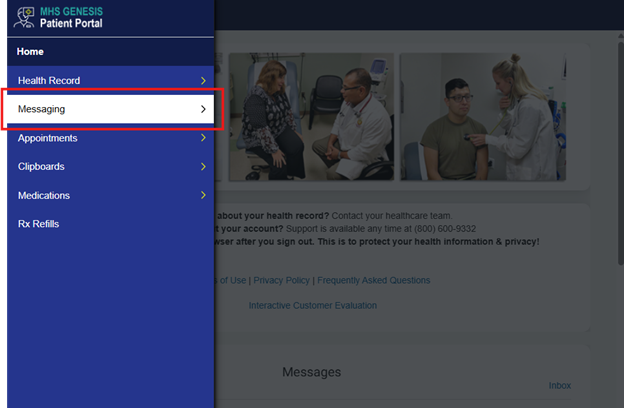
Log on to MHS GENESIS Patient Portal
-
Click, “Messaging”
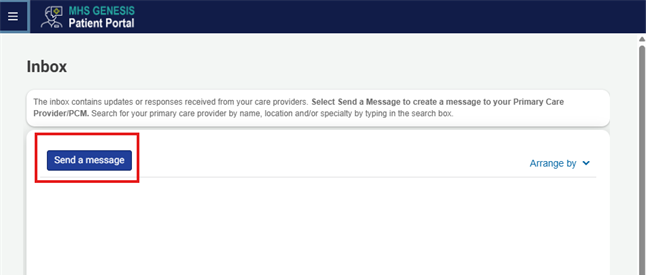
3. Click, “Send a Message”
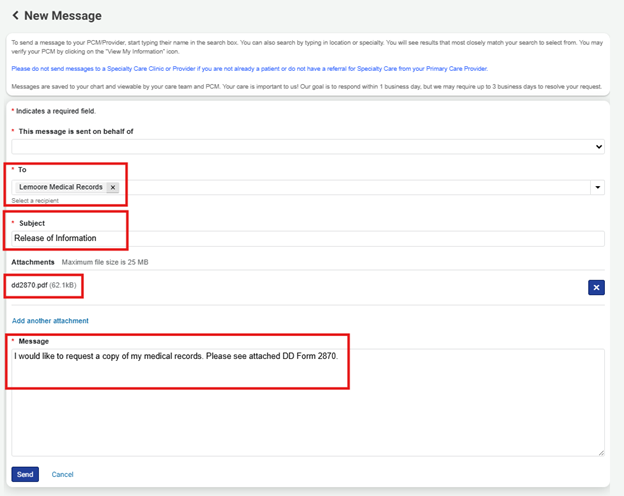
4. Enter the correct patient for whom the message is sent on behalf of. In the “To” box, search Lemoore Medical Records. Place the subject, provide relevant message in the message area and then click “Choose File” to search your local machine for the DD Form 2870 or other applicable documentation that you need to send.
Sample DD2870
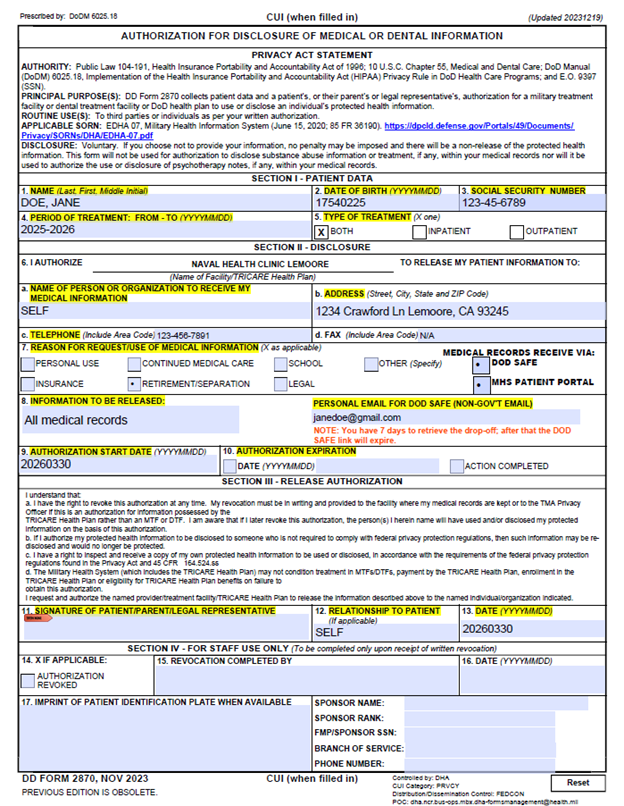
How to Fill Out DD Form 2870 (Step-by-Step)
You do NOT need Adobe Acrobat or any special software. You can complete and sign the entire form right in your web browser (Google Chrome, Microsoft Edge, or Safari work best).
1. Download the form DD 2870
2. Open the PDF in your browser
On a computer (PC or Mac):
Double-click the downloaded file. It should open automatically in Chrome or Edge.
If it opens in another program, right-click the file → “Open with” → Chrome or Edge.
On a phone or tablet (iPhone, Android, iPad):
The file usually opens automatically in your browser after downloading.
If it goes to your Downloads/Files app, tap the file and choose “Open in Chrome” (or Safari/Edge).
3. Fill in your information
Tap or click each field and type:
Box 1: Your full name (Last, First, Middle Initial)
Box 2: Date of Birth (YYYYMMDD)
Box 3: Social Security Number or DoD ID
Box 4: “All time periods” (or specific dates if needed)
4. Section II – Who receives the records
Box 6a: Type your own name (if requesting for yourself)
Box 6b & 6c: Enter the current mailing address and phone number
5. Purpose & Details
Box 7: Check the reason for request; also choose if you want to receive via DOD SAFE or MHS GENESIS Portal
Box 8: Type “All medical records” ; also make sure to place your personal email address for DOD SAFE files.
6. Sign the form – Draw your signature in the browser
Scroll to Box 11.
On a computer: Click the Draw / Pencil tool at the top of the PDF viewer, then use your mouse or trackpad to draw your signature.
On a phone or tablet: Tap the Draw / Pencil tool, then use your finger (or stylus) to neatly draw your signature.
In Box 12, type “SELF” (if you are the patient signing) or others.
7. Date & Save the completed form
Box 13: Enter today’s date.
On a computer: Press Ctrl + S (or click File → Save As) and save the PDF.
On a phone or tablet: Tap the Share or Download icon in your browser (usually at the top or bottom), then choose “Save to Files” or “Download”.
How to Claim Files From DOD SAFE
1. You should receive an automatic email from DOD Safe, click on the URL link to take you to the DOD website.
2. Next, it will prompt you to enter the Claim ID and Claim Passcode which will be found in the same automatic email from DOD Safe that you used to click the link from.
3. Afterwards, click pick up files.
4. Select the files you want to download
5. Click download selected files
6. This next part will ask you to enter the passphrase from the email received from NHC Lemoore Medical Records staff.
7. You should now be able to open and download your pdf files to your computer or device.
Updated: June 25, 2026